The Secrete in Storing Many Textures
The Secret to Storing Many Textures
How do large games like Sea of Thieves or Minecraft store thousands of textures?
Keeping every texture as a separate image would mean loading and managing a huge number of texture resources. More importantly, rendering them individually can require the GPU to repeatedly switch between textures.
The solution is texture atlasing: pack many textures into a single large image and access each texture by its location inside the atlas.
For example, this is the texture atlas used in my voxel engine:
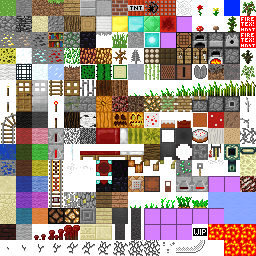
My atlas contains a 16 × 16 grid, giving me 256 individual textures in a single image.
A texture atlas is simply a large image containing many smaller textures packed together. Instead of binding a different texture whenever a block changes, the engine can keep the same texture atlas bound and change which part of it each face samples.
Converting a Texture Index into UV Coordinates
To understand how this works, we first need to look at UV coordinates.
When OpenGL samples a texture, its coordinates range from (0, 0) to (1, 1):
- Top-left:
(0, 0) - Top-right:
(1, 0) - Bottom-left:
(0, 1) - Bottom-right:
(1, 1)
These coordinates describe the entire texture atlas.
Since my atlas is divided into a 16 × 16 grid, each individual texture occupies:
1 / 16 = 0.0625
of the atlas's width and height.
Therefore, if a texture is located at column 3 and row 2, its top-left UV coordinate is:
(3 / 16, 2 / 16)
and its bottom-right coordinate is:
(4 / 16, 3 / 16)
The texture's position in the atlas can therefore be converted directly into the range of UV coordinates that its vertices should use.
How I Convert a Texture Index into UV Coordinates
Each vertex in my mesh stores a UV coordinate that tells the shader which point on the texture to sample.
My voxel engine only renders cubes, so every face is a square made from exactly four vertices. I also keep those four vertices in a consistent order.
I can therefore determine which corner of the texture each vertex should use from its local vertex index:
0: top-left1: top-right2: bottom-right3: bottom-left
This means I do not need to manually store four UV coordinates for every block texture. Given a texture's index in the atlas and the vertex's index within the face, I can calculate the correct UV coordinate.
I wrote the conversion as a small helper function:
static vec2 convert_to_uv(int index, vec2 texture_coord) {
	float x = texture_coord.x;
	float y = texture_coord.y;
	if (index == 0) { //top-left
		return vec2((x - 1)/textures_columns, y/texture_rows);
	}
	else if (index == 1) { //top-right
		return vec2(x/textures_columns, y/texture_rows);
	}
	else if (index == 2) { //bottom-right
		return vec2(x/textures_columns, (y - 1)/texture_rows);
	}
	else if (index == 3) { //bottom-left
		return vec2((x - 1)/textures_columns, (y - 1)/texture_rows);
	}
	return vec2(-1, -1); //invalid index
}
For example:
//texture index in the atlas
vec2 texture_coord = texture_map[type][face];
//assign UV based on vertex corner. i is the index of a vertex used in EBO
vertex.texture = convert_to_uv(i % 4, texture_coord);
This keeps the mesh generation code simple: it only needs to know which texture a block uses, while the UV coordinates are generated automatically from the texture's atlas index.